Track project hours online and use the entries for timesheets, invoices and financial reporting. QUANTICAL.ERP connects your team’s time tracking with the planning and billing of your client projects.
Calendar, daily entries and weekly overview in one view.
Time tracking in QUANTICAL.ERP at a glance.
Book working time on client projects and internal projects
View time bookings in the calendar or in the list
Book several days at once and take over planned hours
Create timesheets from booked times
Mark billable hours and invoice them
Analyse time spent, revenue and costs per project
From time entry to invoice.
Useful time tracking records what your team worked on and which hours you can bill. Here is how that works in QUANTICAL.ERP.
Screenshots from our German product documentation show sample data. You can enlarge every view.
Assign hours to the right project
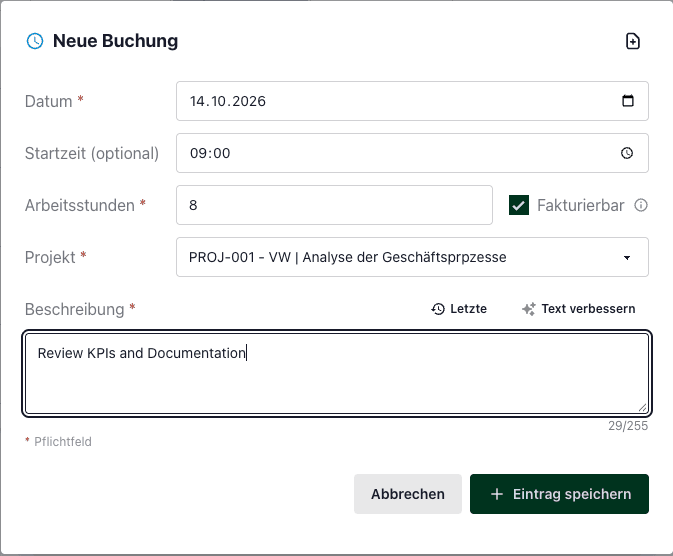
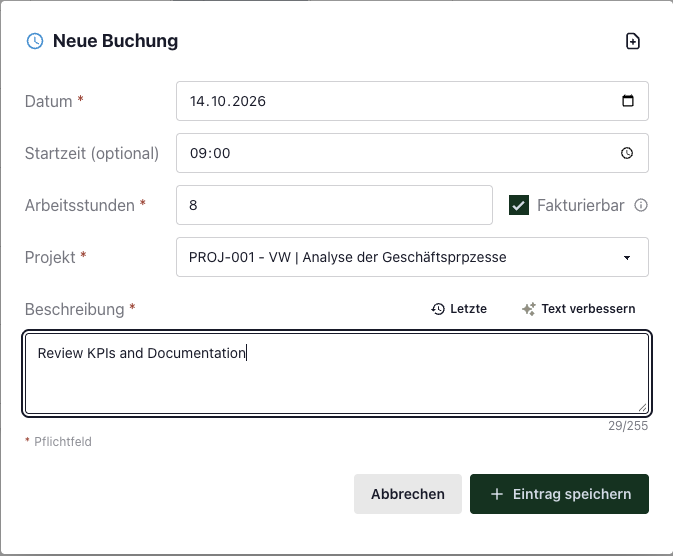
Choose a date and project, enter the hours and describe the work. For client projects, the Billable switch determines whether an entry will be billed later. Record internal meetings or training against internal projects.
A start time is optional. Recent project entries help you write a description; an AI text tool can turn your notes into sentences. Review the result before saving.
Enlarge viewThe entry records hours and work performed. The Billable switch controls billing.
Enter several days or use planned hours
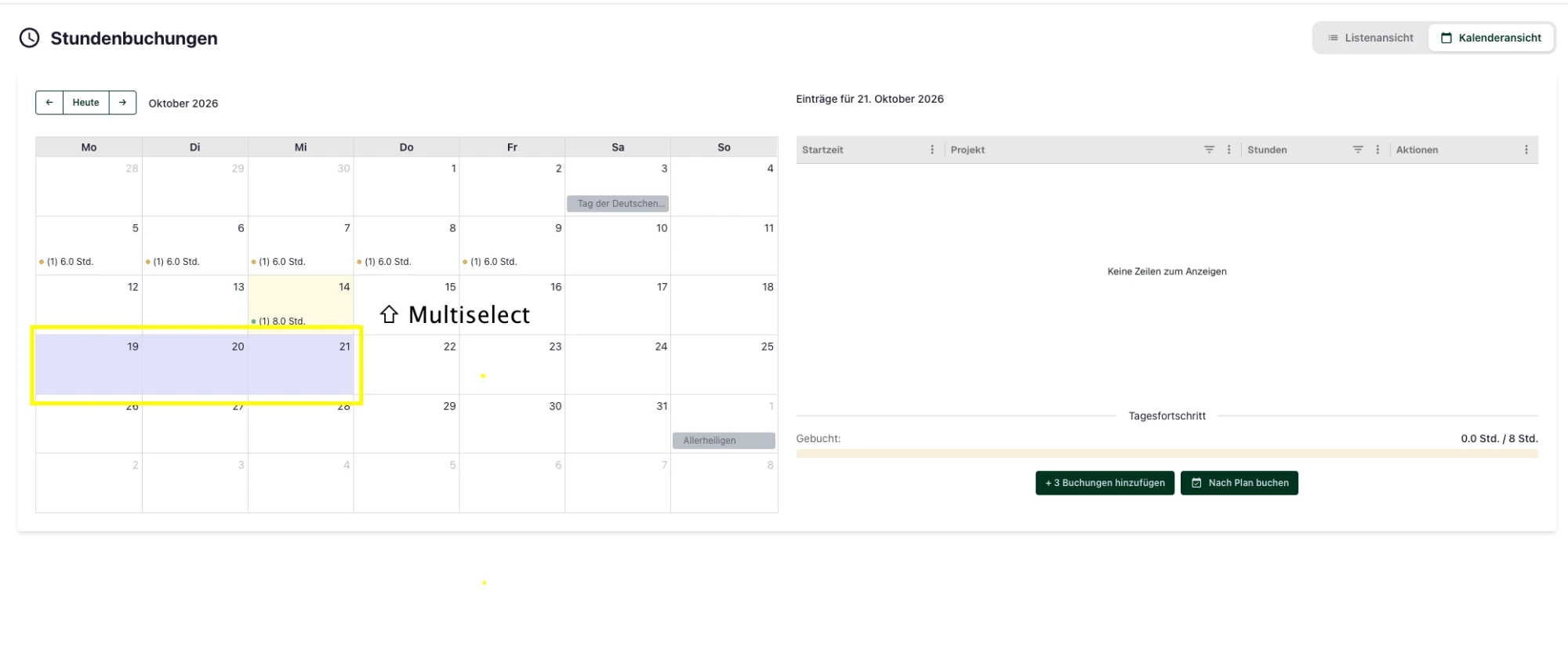
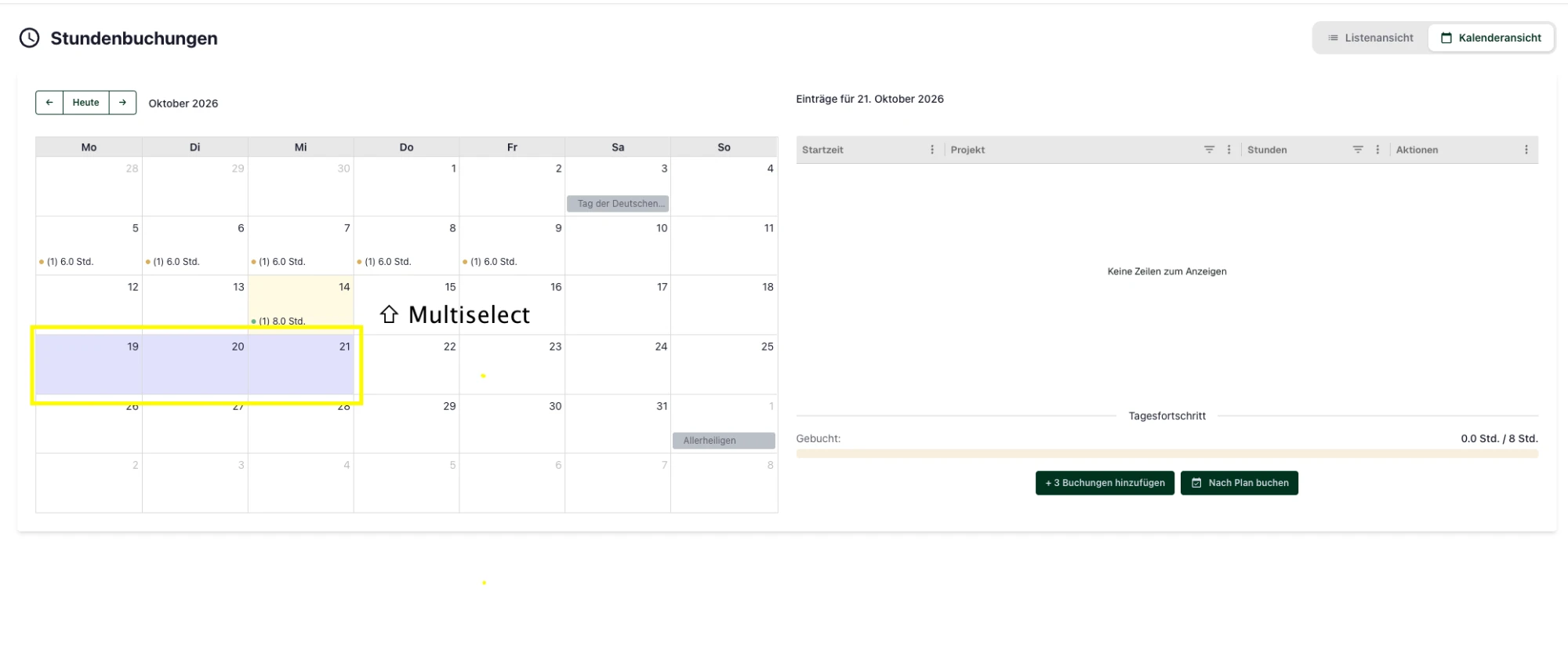
If you work on the same project for several days, hold Shift and select the dates in the calendar. Or choose Book from plan: outstanding planned hours from your project assignments become a proposal for the selected week. You can adjust hours and descriptions before saving the entries together.
The proposal accounts for public holidays, recorded leave and sickness. It is an entry aid: check that the proposed hours match the work actually performed.
Enlarge viewSelect several dates or open a weekly proposal. The screenshot shows the calendar selection.
Create timesheets from recorded hours
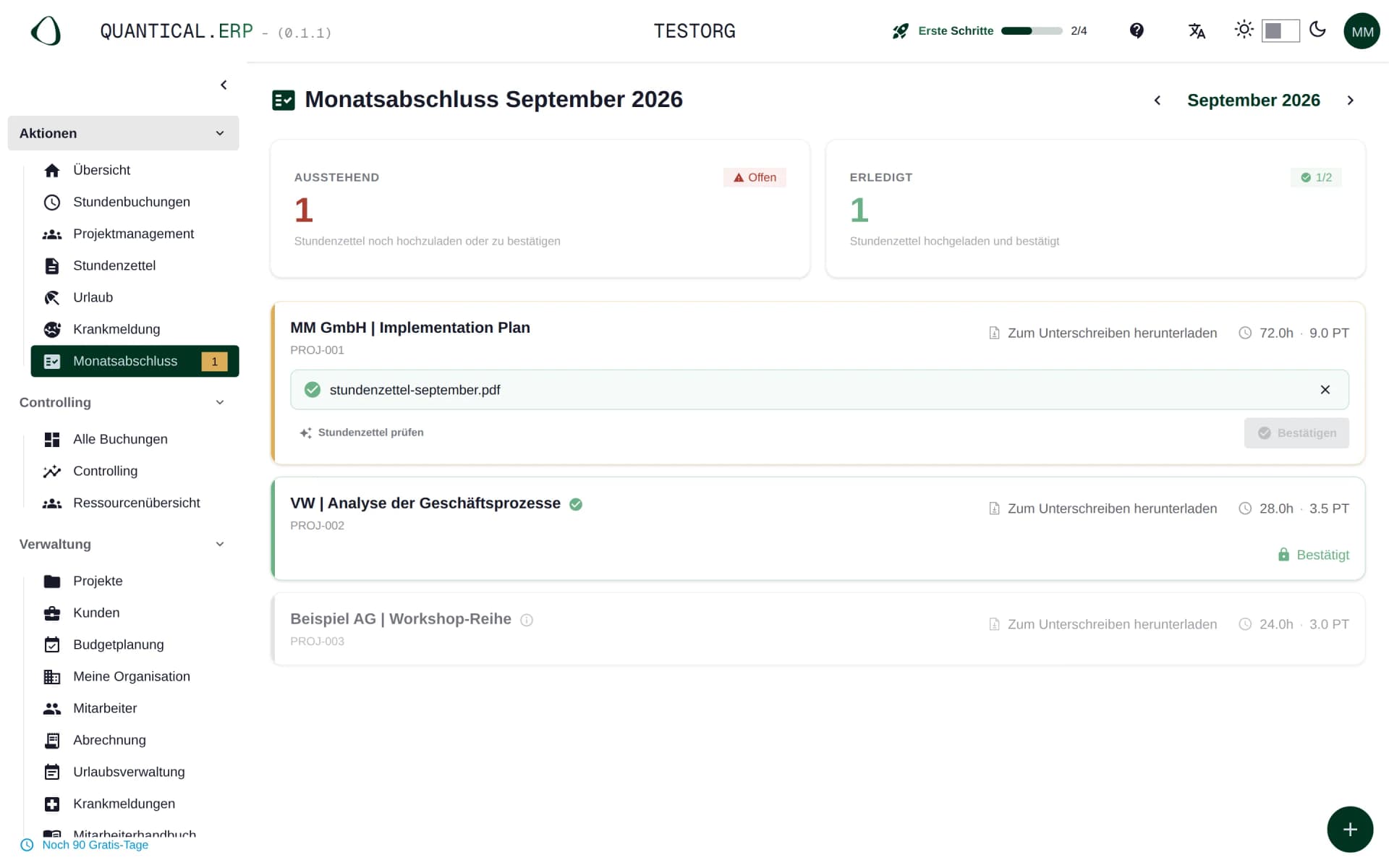
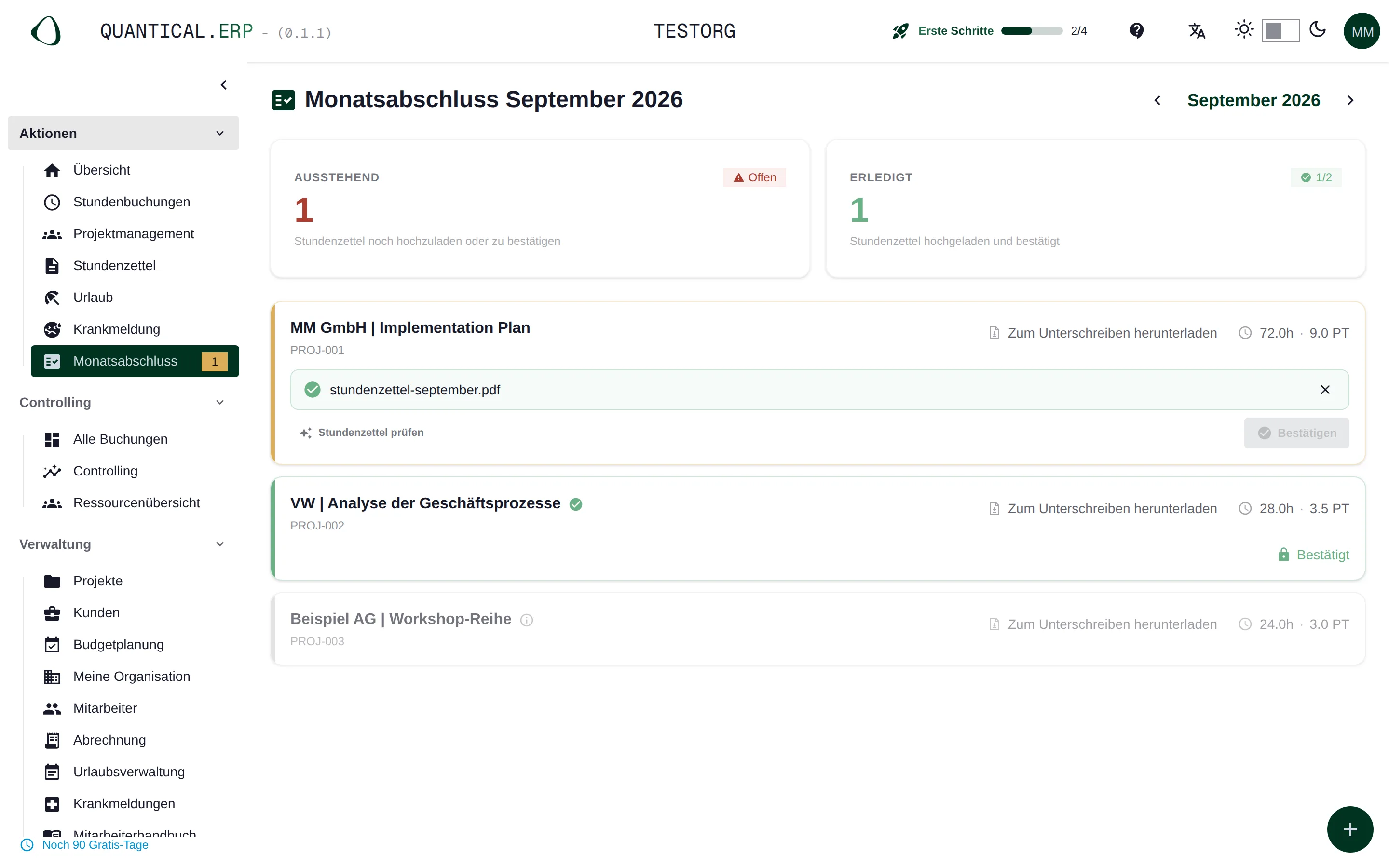
Create digital timesheets from the hours recorded for each project and period. The month-end view shows which documents are still missing. If your client needs to approve a timesheet, obtain approval outside QUANTICAL.ERP and upload the approved document afterwards.
A missing timesheet does not automatically block an invoice. Your agreement with the client determines whether approval is needed before billing.
Enlarge viewSee outstanding, uploaded and confirmed timesheets for each project.
Invoice billable hours
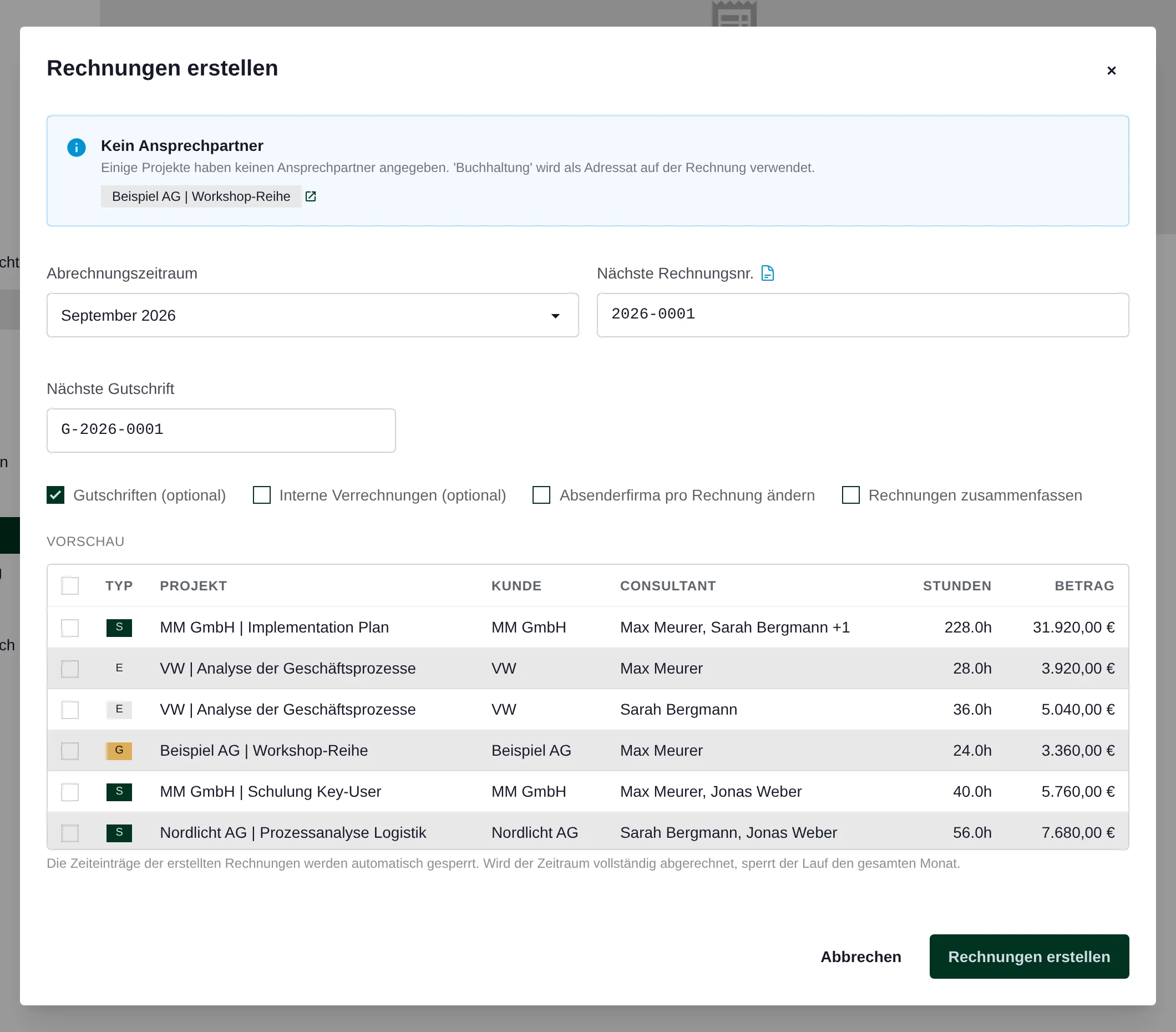
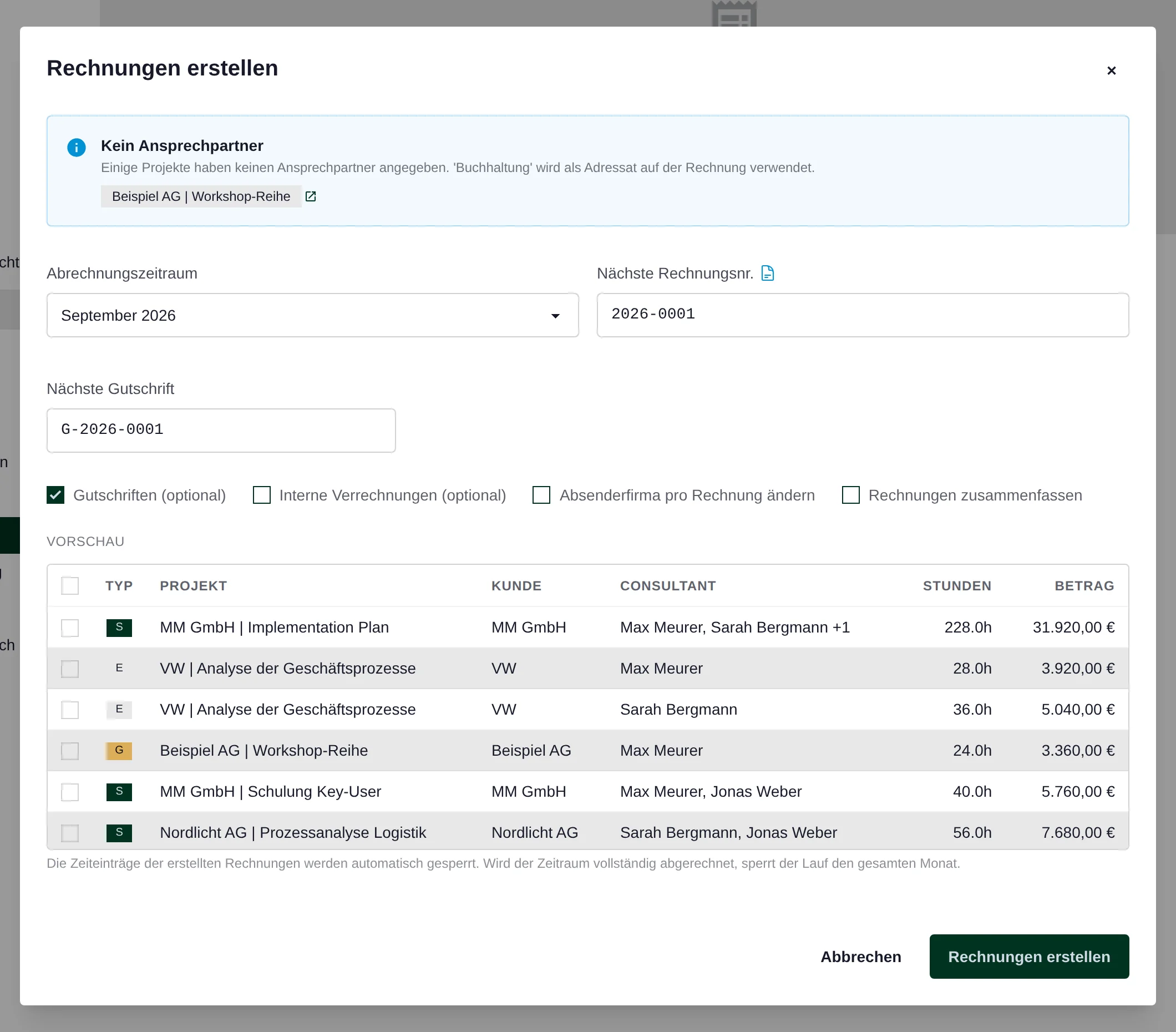
For time-based billing, the invoice run uses billable entries and the applicable billing rates. Depending on your setup, invoice each employee and project separately, group employees by project, or consolidate projects by client. Review the invoice run before creating the documents.
Non-billable client work stays visible in time tracking but does not contribute to the invoice amount. Billed entries are locked against subsequent changes.
Enlarge viewBilling uses the existing project entries and hourly rates.
Review effort, revenue and costs
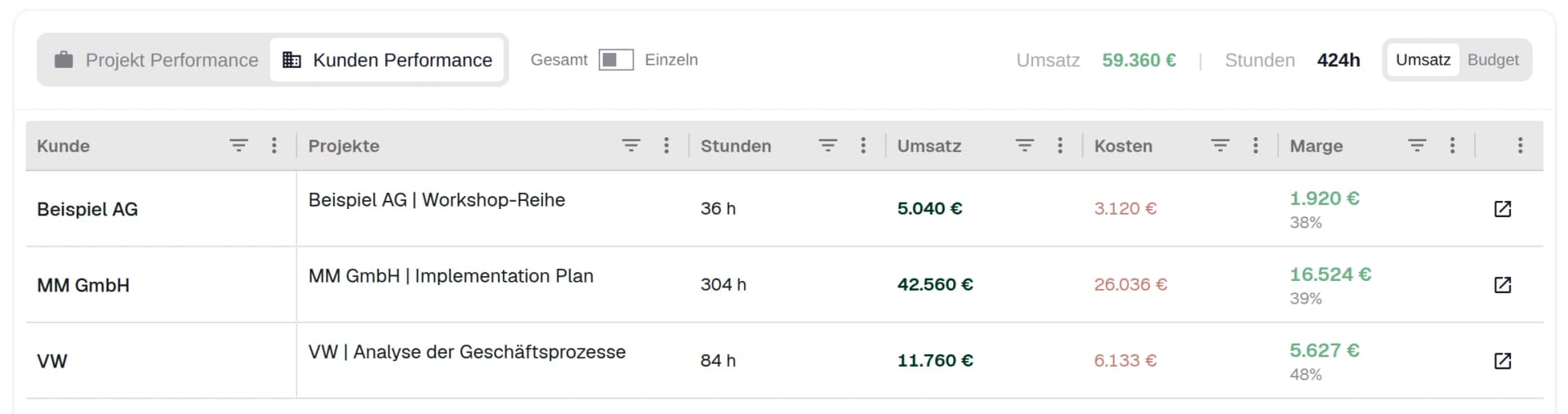
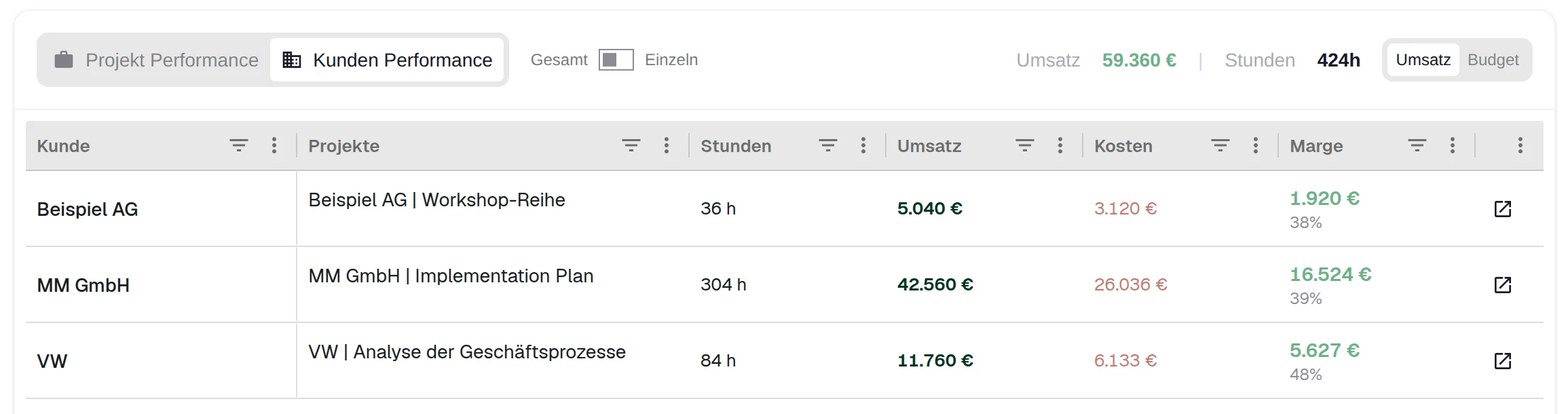
Financial reporting shows how recorded hours are distributed across clients and projects. The value of the work and its allocated costs help you assess project performance. Non-billable work remains part of the picture: it creates effort even when it does not produce an invoice.
Invoice amounts and reporting revenue can differ, for example when a separate statistical hourly rate is configured. The metrics guide explains the calculation basis.
Enlarge viewClient reporting adds a financial assessment to the hours overview.
Eight hours recorded. How many can you bill?
An example: of 8 recorded hours, 6 belong to a client project at an agreed rate of €150 per hour. The employee spent the other two hours on internal training.
That makes €900 billable to the client. This is the invoice amount before VAT, not profit. Assessing the result also requires the allocated costs, including personnel costs.
Worked example with fictional entries and a single billing rate
Activity
Hours
Billable
Client project concept
4 h
€600
Client workshop
2 h
€300
Internal training
2 h
€0
Total
8 h
€900
75% of recorded hours are billable. This share does not measure employee utilization, which needs a separate reference such as available working hours.
Time tracking for the whole team.
Employees record their own hours. Whoever handles monthly billing needs an overview of the entries and their project assignments. The calendar, list view and organization-wide entries view support this work.
Employees see recorded hours against their daily target in the calendar. The weekly overview shows the distribution across projects. Leave and sickness are recorded separately and also appear in the calendar.
Correct entries before billing
Until an entry is billed or locked, its date, hours, project, description and billable status can be changed. Employees can correct the assignment before the invoice run.
Protect completed entries
The organization owner can configure automatic daily, weekly or monthly locks. Employees cannot edit or delete locked entries. Contact the owner if a locked entry needs correcting.
Time tracking, planning and billing in one price.
Try QUANTICAL.ERP free for 90 days. Afterwards, the platform costs €12.90 per user per month, plus VAT. Time tracking, digital timesheets, invoicing and financial reporting are included.
All other QUANTICAL features, future updates and extensions are included too. QUANTICAL.ERP is developed by the consultancy rwQUANTICAL GmbH and used in its daily operations.
Try it free for 90 days
Create a client project, record hours and test the path to billing against your own processes.
QUANTICAL.ERP is built for professional services firms, including consultancies, IT service providers, agencies, law firms and audit firms. It fits teams that need to assign hours to clients and projects and use those entries for timesheets, billing and financial reporting. You work online in a browser; no local installation is required.
How do I record project time?
Open a new entry in the calendar or list view and enter the date, project, hours and description. The start time is optional. The entry form uses quarter-hour steps. For client projects, also choose whether the work is billable.
Can I use project planning to create time entries?
Yes. Book from plan creates a weekly proposal from the outstanding planned hours of your project assignments. Hours already recorded, public holidays and recorded absences are taken into account. Review the proposal, add descriptions and adjust hours to reflect the work actually performed. Entries are only created when you save.
How do I separate billable and internal hours?
Each entry on a client project has a Billable switch. When it is off, the effort remains recorded but is not invoiced. Record training or internal administration against internal projects. This separates client work from internal work without losing non-billable hours.
Can I change recorded hours later?
Yes, until the entry is billed or locked. Employees can edit or delete their own entries. The invoice run locks billed entries; additional automatic or manual locks can limit the period that remains editable. Contact your organization owner about locked entries.
Can I create digital timesheets from the entries?
Yes. Generate PDF timesheets from existing project entries. If your client needs to sign or approve them, that happens outside QUANTICAL.ERP. You can then upload the approved document in the month-end view. QUANTICAL.ERP does not provide its own digital client signature for this process.
Does project time tracking meet German working time recording requirements?
Project time tracking and statutory working time recording serve different purposes. The entry form records hours per project and an optional start time, but no separate end or break times. According to the German Federal Ministry of Labour and Social Affairs (BMAS), the start, end and duration of daily working time must be recorded. Project hours alone are insufficient; check how your full working time process is documented.
How much does online time tracking cost?
Try QUANTICAL.ERP free for 90 days. Afterwards, the price is €12.90 per user per month, plus VAT. All QUANTICAL features are included, including planning, digital timesheets, billing and financial reporting. Future updates and new features are included too.