Project time tracking and client billing for auditors.
Track project hours for each audit engagement and bill your clients for the work recorded. QUANTICAL.ERP brings billable hours and rates into the invoice preview, individually or grouped by client according to the billing method.

Keep track of clients, audit engagements and team capacity.
From planning to the invoice: switch views to explore the workflow directly in QUANTICAL.ERP.

- Hourly rates per employee and engagement
- Controlling with actuals and forecast
- Invoices straight from time entries
- Self-service timesheet creation
- Plan audit teams and copy planned hours
- Store signed timesheets centrally
- Calculate bonuses from utilisation and revenue
- Control access with role-based permissions
- Improve activity descriptions
- Manage vacation and sick leave
- Connect third-party systems via REST API
- Import and export data through Excel
How much time does an audit engagement take?

One client, several engagements and a team with different hourly rates: hours, budgets and billing need to match if you want to manage the work commercially.
In QUANTICAL.ERP, you create a client record and a separate project for each engagement. This keeps a financial statement audit and an additional advisory engagement separate in your reports.
The consultancy rwQUANTICAL GmbH develops the platform and uses it in its own project work. The office photos show the rwQUANTICAL team.
Plan your audit team, record work and review the time spent on each engagement. Keep your audit documentation in the audit software you use for that purpose.
From project time tracking to client billing.
The fictional client Muster GmbH commissions a financial statement audit. We plan a €30,000 budget and three team members for the project “Financial statement audit 2026”. This example uses time-based billing.
1. Set up the client and audit engagement
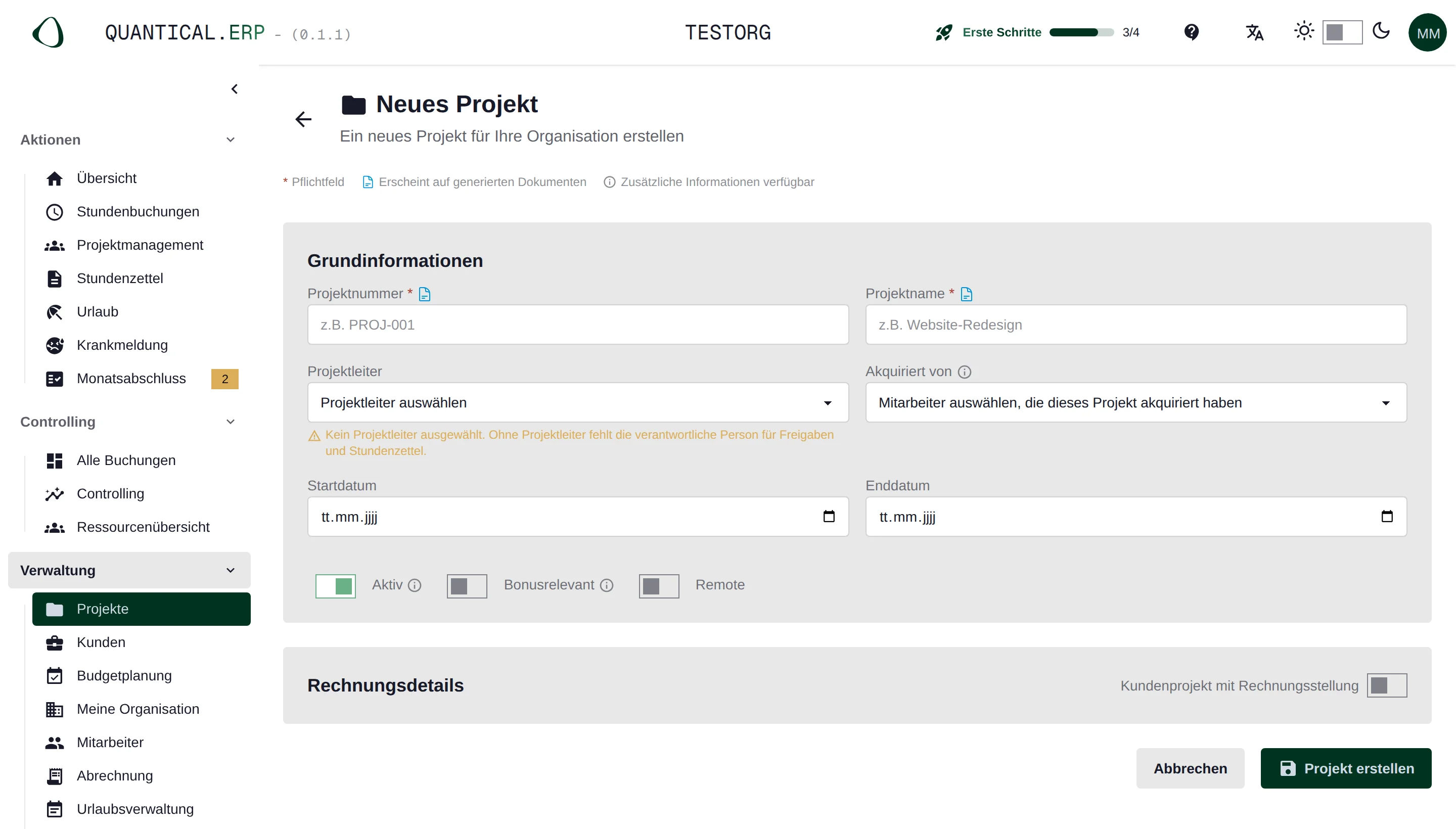
Create the client record and a separate project for each engagement, with a reference number, dates and a responsible person. Assign employees and set their hourly rates. Each time entry uses the rate valid on its date.
Create a second project under the same client for an additional engagement. This keeps audit hours separate from advisory work. The application uses the terms Client and Project for these records.
2. Plan the team and engagement budget
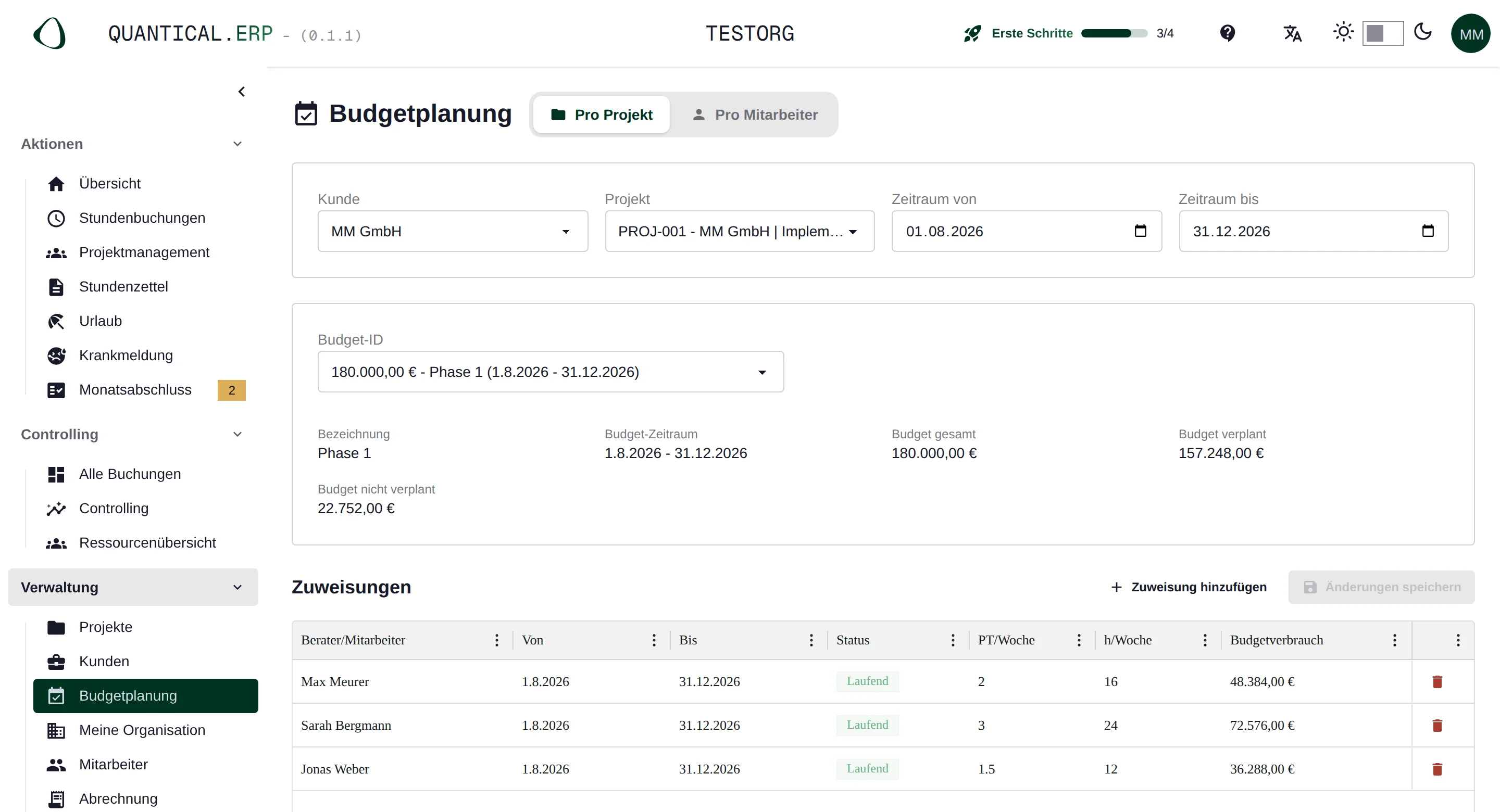
Set a budget for the engagement and allocate planned person-days to employees and weeks. The resource overview helps you spot overlaps with other engagements and check available capacity.
The partner, audit manager and audit assistant in our example have different rates. Set these for each person and project with validity dates. One planned person-day in QUANTICAL.ERP equals eight hours.
3. Record audit hours and activities
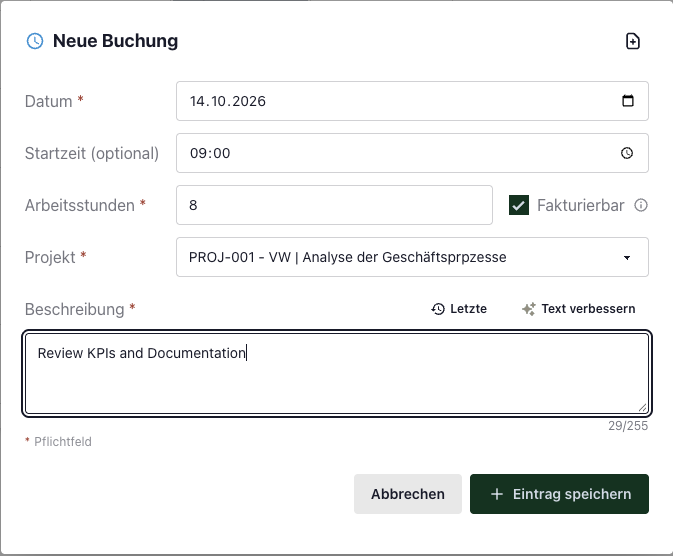
Each team member records hours against the audit engagement and describes the work. For client projects, the Billable switch determines whether an entry goes into hourly billing. Record internal training on a separate internal project.
A useful description names the work carried out, for example “Reconciled open items with the balance list”. The entry records time spent. Audit findings and working papers belong in your audit documentation.
4. Compare budget consumption with the work recorded
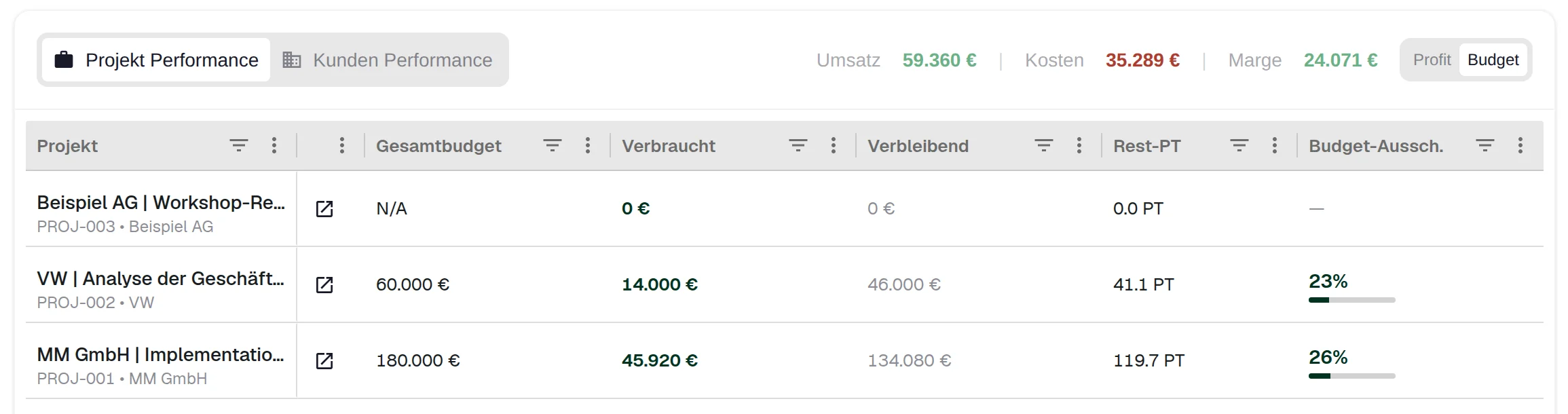
Value billable hours at the configured rates and compare the amount with the engagement budget. The example breaks down the calculation by team member. Review costs and margin separately in the Profit view of project controlling.
The remaining €6,600 is the budget left after valuing these hours. It is not profit. For a cost review, include the recorded employee costs and check non-billable work on the engagement too.
Worked example: 180 hours on an audit engagement Team member and rate Hours Value Partner 12 €3,000 Audit manager 48 €8,400 Audit assistant 120 €12,000 Total 180 €23,400 Of the €30,000 engagement budget, €23,400 has been consumed. That is 78%, leaving €6,600.
Simplified example covering the whole engagement, with one person in each role. All 180 hours are billable. No different statistical rates and no VAT. The value is neither an employee cost calculation nor cash received. 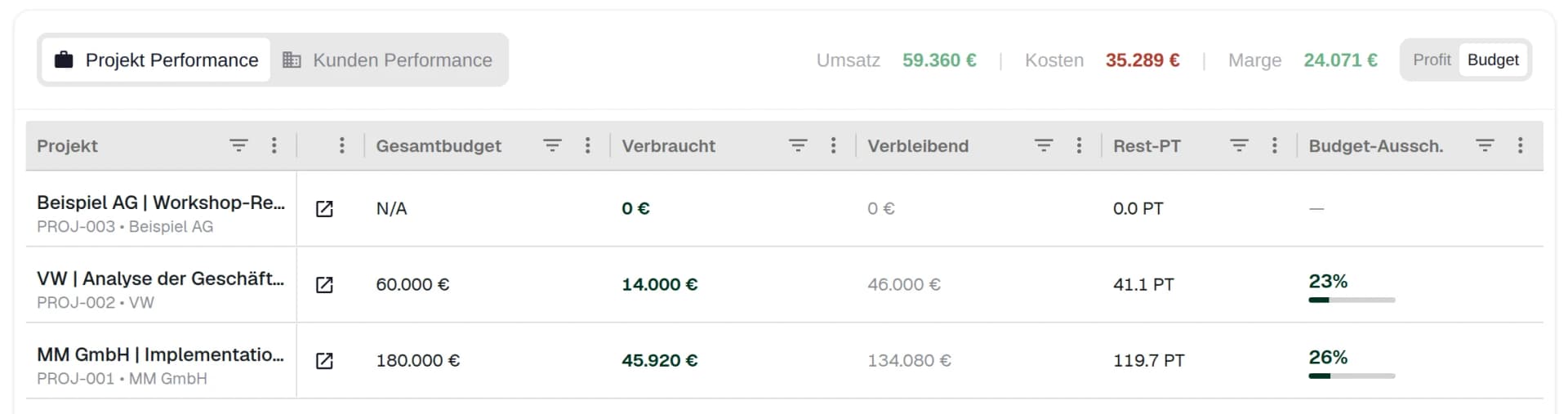
This is how controlling displays budgets. The projects and amounts in this German documentation screenshot differ from the worked example. 5. Bill clients for the work recorded
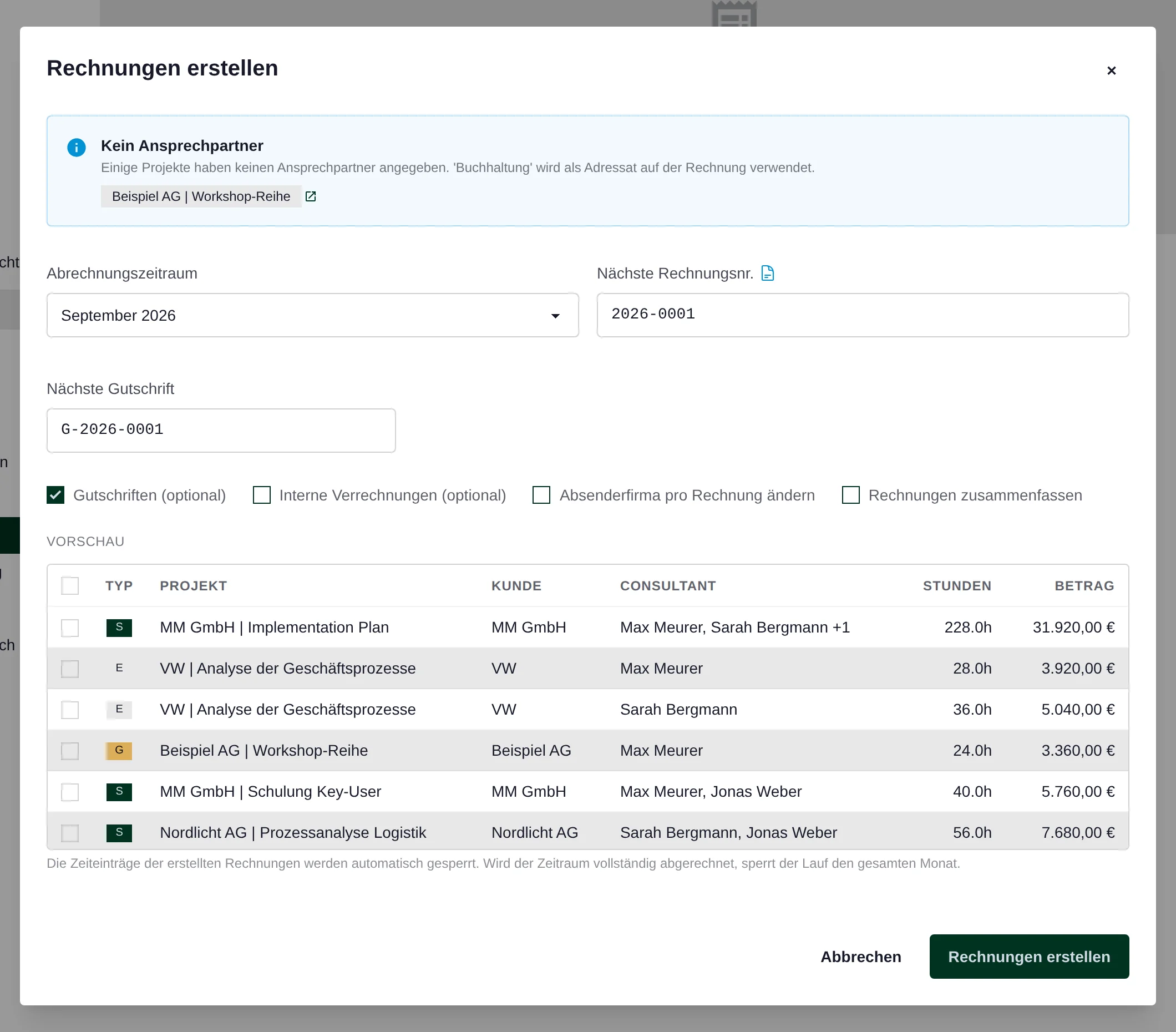
The invoice run values billable hours from the selected month that have not yet been invoiced, using the rates valid for those entries. Choose the billing method: one invoice per employee and engagement, one per engagement or a combined invoice for a client’s engagements. Check hours and amounts in the preview before creating invoices.
Check hourly rates and any required timesheets before the run. Obtain client approval outside QUANTICAL.ERP, then upload the evidence. A missing timesheet does not automatically block the invoice run.
Extra hours call for a closer look at the engagement.
If an engagement takes more work, it first shows in recorded hours and budget consumption. Check which activities and team members account for the extra time.
Then compare the remaining budget with the work still planned. This gives you recorded work to use when deciding on the team and schedule.
Hours valued at hourly rates do not represent cash received. High budget consumption alone does not tell you the margin either. You also need to account for the employee costs recorded in the system.
These figures answer different questions.
Time and activity recording: who worked on which audit engagement, when and for how many hours?
Budget: how much of the engagement budget has been consumed by billable hours valued at the configured rates?
Profitability: how does the value of recorded work compare with allocated employee costs? Use the cost and margin reports in project controlling.
Questions about time tracking for auditors
Want to see how your engagements, hourly rates and fee invoices fit? Bring an example to the demo.
Book a DemoHow do we assign hours to a client and audit engagement?
Create a client record and a separate project for each audit engagement. Every time entry has a project. You can then report on each engagement by employee and period, while the client view brings the related projects together.
How do we plan an audit team across several engagements?
Allocate engagement budgets to employees and weeks. The resource overview shows available and allocated person-days across projects. It accounts for leave and other absences, helping you compare the team needed for an engagement with existing assignments.
Who can see salaries, costs and margins?
Role-based permissions control access. Employees record their own services. Reports on individual personnel costs and margins are reserved for users with the corresponding permissions.
Does QUANTICAL.ERP replace our specialist audit software?
QUANTICAL.ERP supports commercial management: engagement planning, time tracking, capacity, hourly billing and project controlling. It does not perform an audit or replace audit documentation. Your audit software remains part of the workflow. Documented REST API endpoints allow custom reporting; this does not imply a ready-made connection to a particular audit system.
Can we import existing Excel data?
Yes. The import wizard handles employees, clients, audit engagements, hourly rates, salaries and historical time entries from Excel. Files are checked before import. Data from previous years remains available for historical reporting.
What does QUANTICAL.ERP cost?
Try QUANTICAL.ERP free for 90 days without payment details. After that, it costs €12.90 per user per month, excluding VAT. Every feature and future updates and extensions are included. Cancel monthly. Former employees can remain in the system for historical reporting without being charged as paying users.
How do we separate audit hours from internal activities?
Create internal projects without invoicing for training, administration and other internal work. On a client project, you can mark individual entries as non-billable. Those hours do not go into hourly billing. Apply the same assignment and marking rules across the team so reports remain useful.
Can we record the work on a fixed-fee engagement?
Yes. Record hours for each engagement and compare their value with a budget. The invoice run shown here bills hours at hourly rates; it does not automatically use the budget as a fixed fee. You can create a manual invoice with your own line items for a separate fee invoice. Coordinate hourly billing and manual invoices with your fee agreement.
Is budget consumption the same as employee costs or margin?
No. Budget consumption in the example is billable hours multiplied by the hourly rate. In controlling, a statistical hourly rate greater than zero takes priority if configured. Employee costs come from compensation records and are allocated across recorded hours. Project margin compares the value of work with allocated costs. The invoice run uses the billing hourly rate instead.
Can we combine several audit engagements in one client invoice?
Yes. Combined billing brings the billable project hours for a client’s engagements together in one invoice. This setting applies to all projects for that client and aligns their invoice details. Use group billing if each engagement should have its own invoice; it brings the employees on that engagement together. Both methods use recorded billable hours and the applicable billing rates.
Try it free for 90 days with your audit team.
Plan your audit team across engagements, record audit hours and review engagement budgets. Try every feature with your own data. Updates and extensions are included.
90 days
Try every feature for free.
Afterwards €12.90 per user per month, excluding VAT.
Try free for 90 daysTry QUANTICAL.ERP with your audit team.
Try project time tracking and client billing with your first audit engagement. Assign the team, record hours and review the invoice preview. All features are free for 90 days. In a personal demo, we can discuss your engagement and billing structure.