
Many companies, especially in professional services, look for software that combines time tracking and leave management. Employees should be able to book their working hours to projects, request leave and check their remaining leave. Administrators in turn need this information for project planning, billing and reporting.
QUANTICAL.ERP was built for this use case. Employees record their hours and manage their leave in the same application. This article shows how the individual features work together and what options companies have for managing their employees.
Why time tracking and leave management belong together
In consultancies, agencies and IT service companies, working hours are often booked directly to client projects. For project planning it therefore matters when employees are available and how many hours they can actually work.
If time tracking and leave management run in separate applications, absences often have to be added to project planning by hand. That creates extra work and can lead to wrong capacity planning.
In QUANTICAL.ERP, both features use the same data. Requested and approved leave appears in the time tracking calendar. The automatic distribution of planned project hours also takes leave, public holidays and sickness into account.
Project controlling takes these absences into account as well when calculating available working time. In a week of leave, for example, fewer hours are scheduled for project planning.
Book hours to internal work or client projects
Employees record their working hours in QUANTICAL.ERP in a list or calendar view. Each time entry contains the date, a project, the hours worked and a description of the activity.
Internal projects and client projects are kept apart. Internal projects can be used for training, internal meetings or administrative tasks, for example.
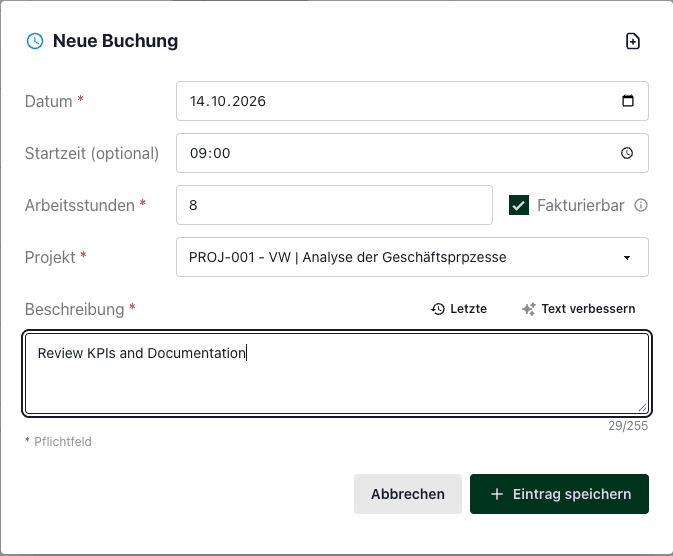
For client projects you also set whether the booked hours are billable. This option is on by default. If internal alignment meetings are booked to a client project, for example, the hours can be marked as not billable.
Employees who regularly work on the same project can select and book several days at once. In the calendar view, they mark the days while holding Shift.
A detailed description is available in the time tracking guide.
Report on working hours and project budgets
For administrators, it is usually not enough to just record the hours worked. Project service providers in particular need to report on them later and assign them to the right projects, employees and clients.
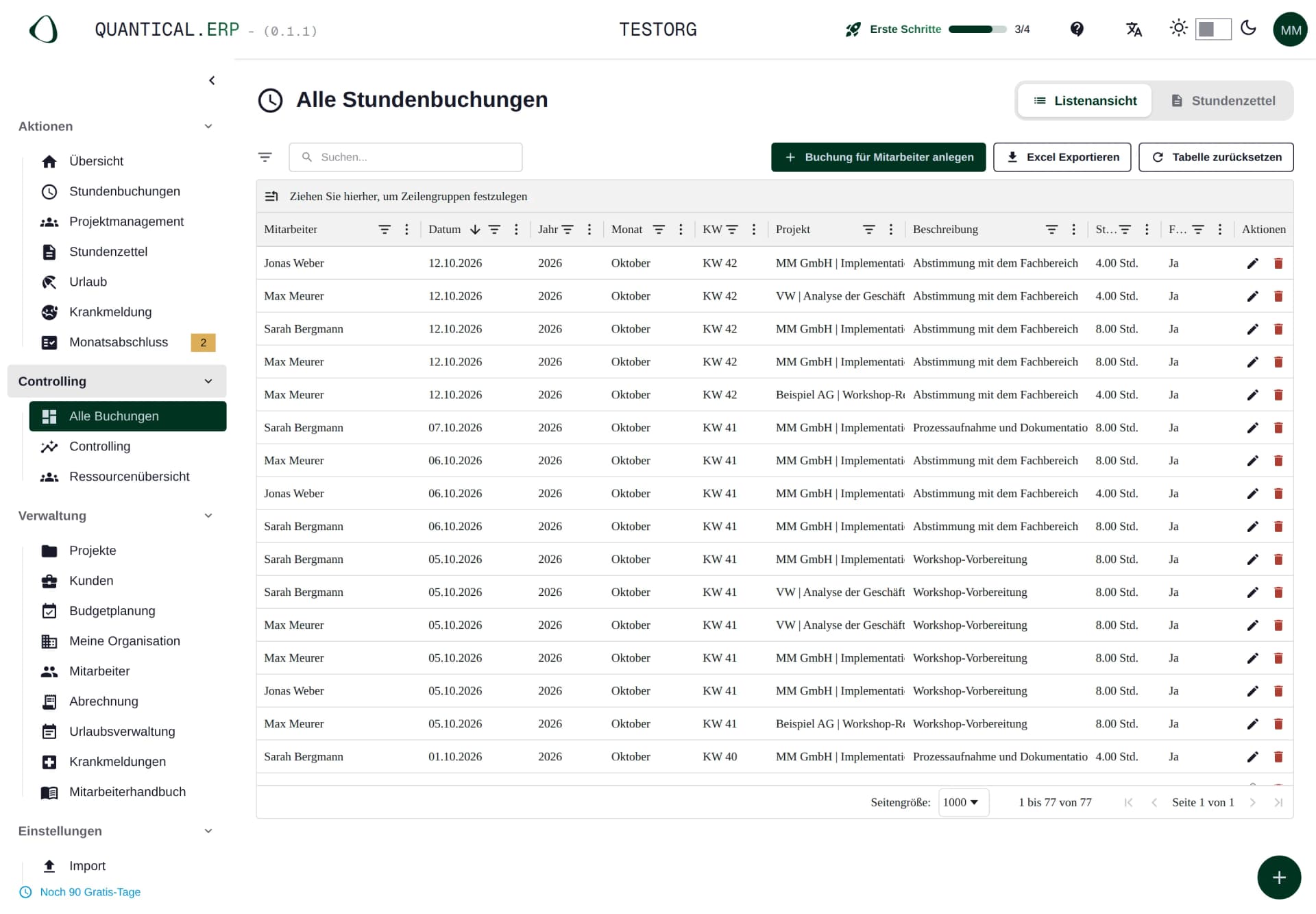
Under Controlling > All Entries, QUANTICAL.ERP shows every time entry in the company. The overview includes the employee, date, project, activity description and whether the hours are billable.
Leave and sickness are listed as separate entries as well. The data can be filtered, grouped by employee and month, and exported to Excel for further analysis.
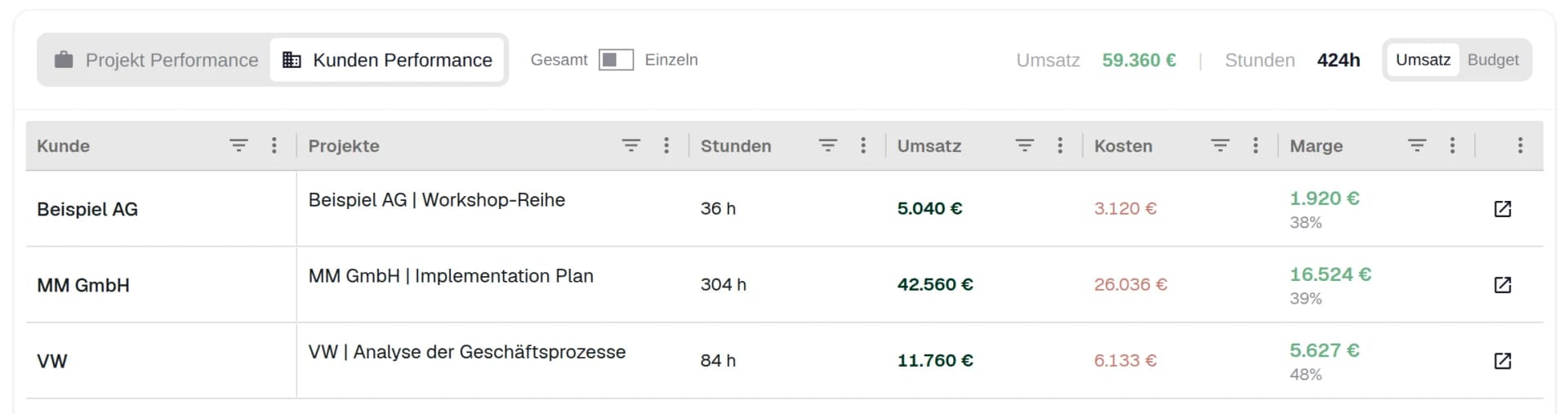
Project controlling then links the booked time to financial figures. Companies see, for example, what revenue and costs a project generated and what margin results from them.
You can also trace how many hours have already been booked to a project, how much of the budget is used and how many person-days remain.
More information is available on the project controlling page.
Request and approve leave digitally
Besides tracking time, employees can request leave directly in QUANTICAL.ERP.
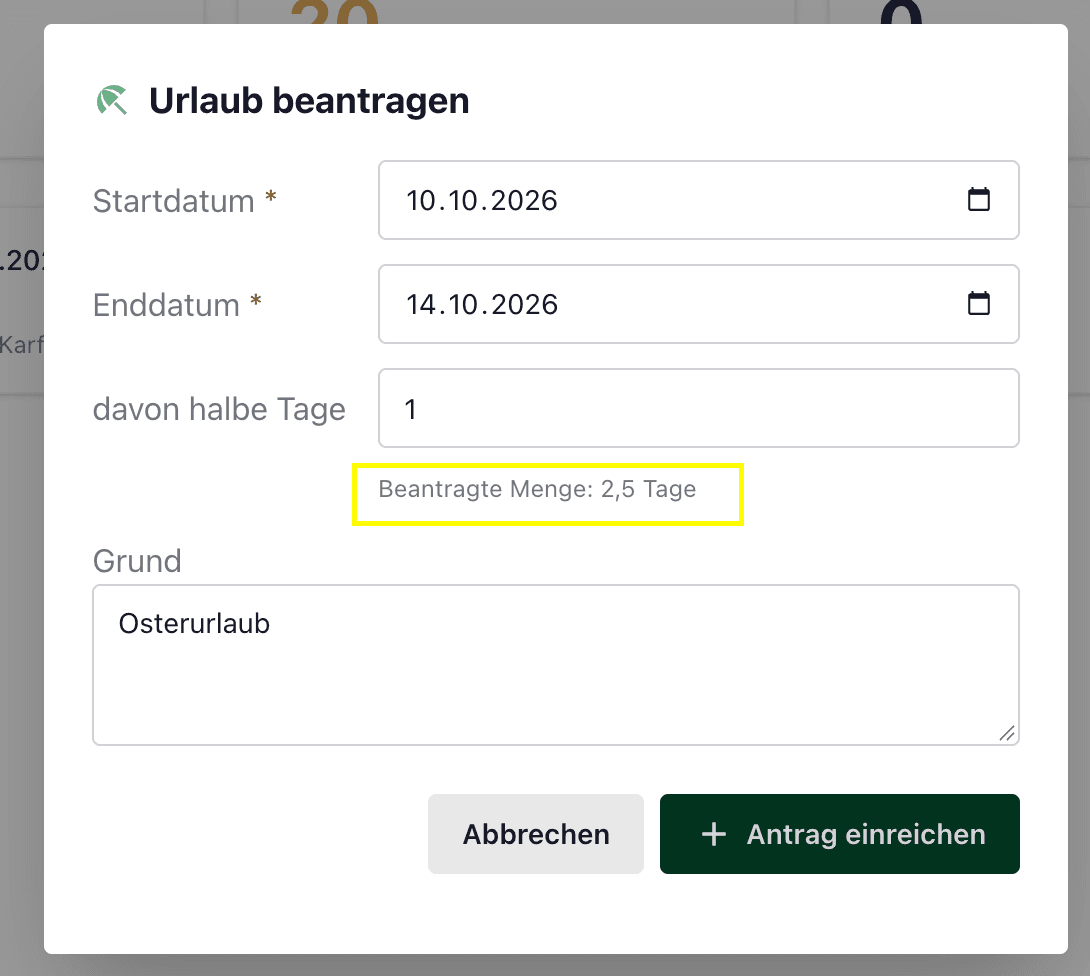
To do so, they choose the desired period under Actions > Vacation. If needed, they can enter half days and add a reason for the request. The system immediately calculates how many leave days the selected period requires.
Administrators see incoming requests under Administration > Vacation Management. Open requests can be approved or declined there with one click. A badge in the menu shows how many requests still need attention.
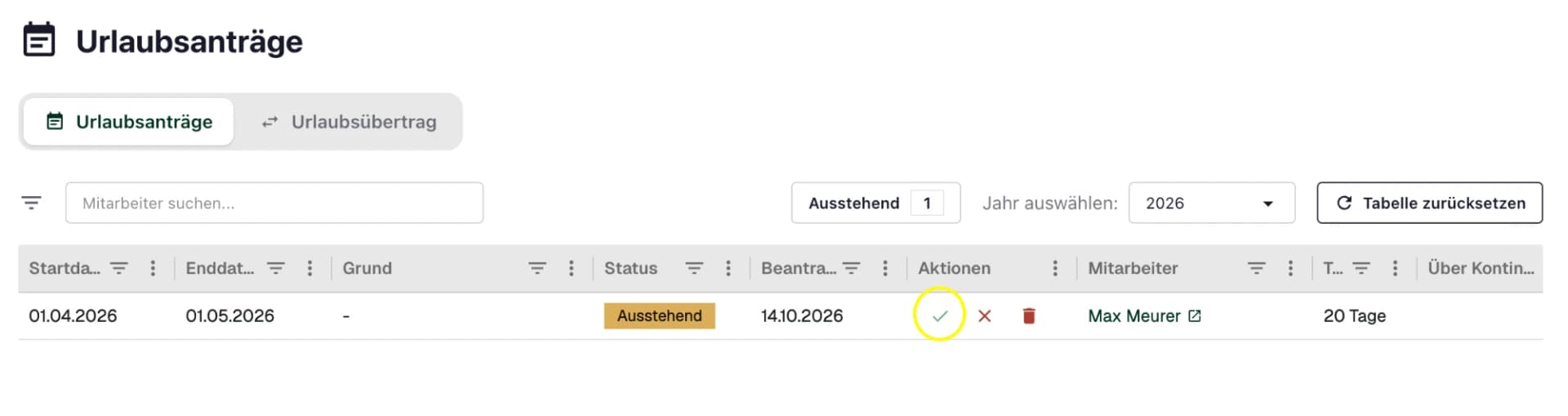
Employees can check the status of their requests at any time. They also see their annual entitlement, leave days already requested, leave carried over from last year and the days still available.
This means employees do not have to ask HR how many leave days they have left.
Set leave entitlement for the company and individual employees
In QUANTICAL.ERP, companies can set an annual leave entitlement that applies to all employees by default.
The settings are under Settings > Administration > Personnel & Absences. There you define, among other things, how many leave days per year apply and whether half days are allowed.
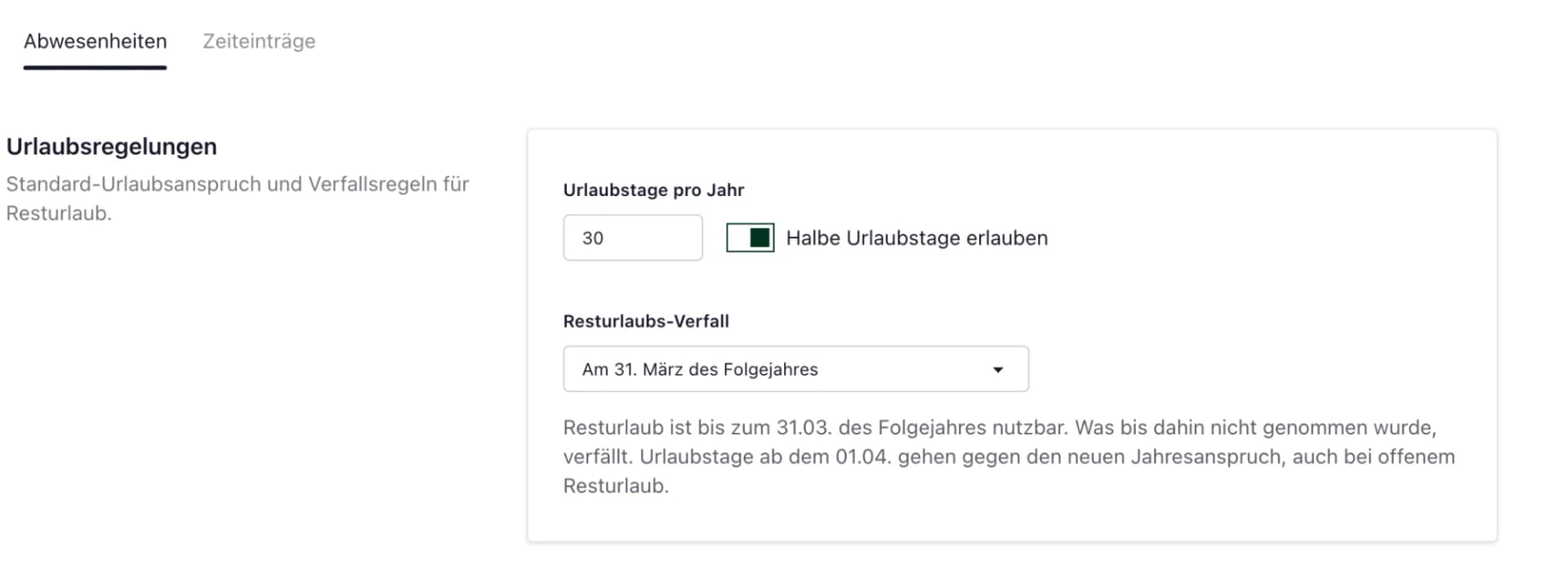
Different arrangements can be stored directly in the master data of individual employees. This matters, for example, when employees join during the year, work part-time or have a different entitlement in their contract.
For this, you can store a separate number of leave days with a specific validity period within the year. Outside that period, the employee's regular annual entitlement applies again.
In Germany, the statutory minimum leave under Section 3 of the Federal Leave Act is 24 working days based on a six-day week. With a regular five-day week, that equals 20 working days. Employment contracts or collective agreements can grant additional days.
Take public holidays into account automatically when calculating leave
For companies with employees in different German states, calculating leave days can get more complex. Public holidays are not the same everywhere in Germany.
QUANTICAL.ERP therefore takes public holidays into account automatically when calculating leave requests.
Companies can decide whether public holidays are determined dynamically from the state in the employee profile or whether the state of the company's registered office applies to all employees.
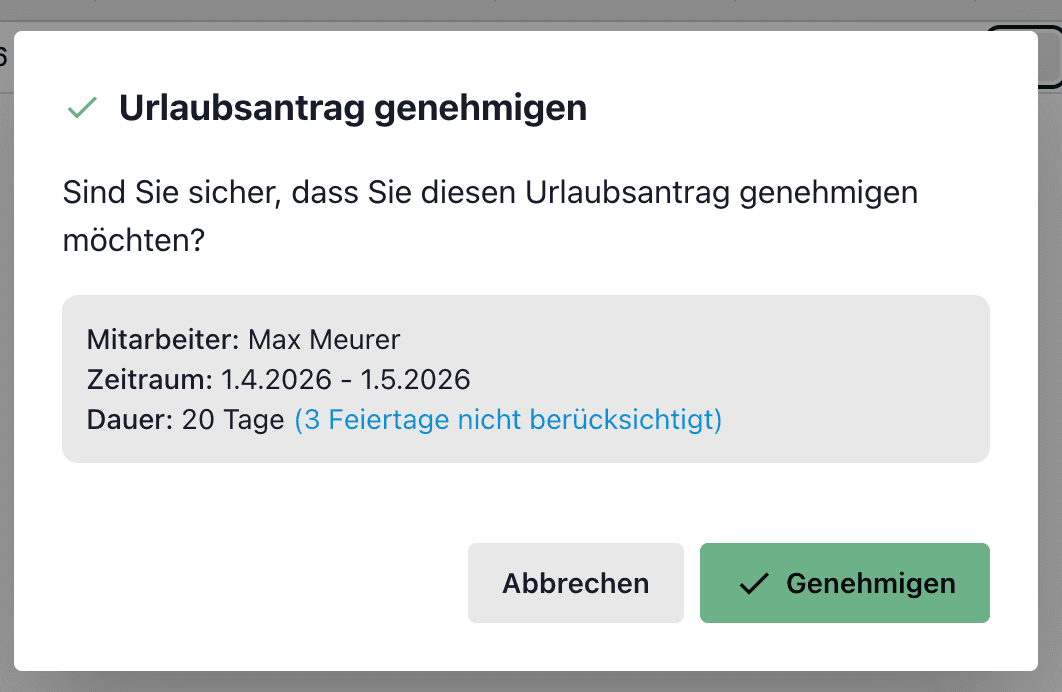
If a public holiday that applies falls within the requested period, that day is not deducted from the entitlement. The included public holidays are already shown in the request.
On approval, administrators also get a summary of the period and the calculated leave days.
Carry remaining leave over into the next year automatically
Leave days that were not taken can be carried over into the next year at year end. In QUANTICAL.ERP, the carry-over rules decide how long these days remain available.
Companies can choose between three settings:
- Expiry on 31 March: carried-over days are available until the end of March of the following year.
- Expiry on 31 December: remaining leave can be used until the end of the following year.
- No automatic expiry: days that were not taken remain and are carried over again.
At year end, Vacation Management can create the carry-over for all active employees based on their remaining days.
Deviations can be adjusted in the employee master data. If an employee took more leave than they were entitled to for the year, for example, a negative carry-over can arise. It reduces the following year's entitlement and does not lapse automatically.
When requesting leave, employees see how long their carried-over days remain available.
Legally, note that under Section 7(3) of the Federal Leave Act leave should generally be taken in the current calendar year. Carrying it over is possible under the statutory conditions.
According to the Federal Labour Court, statutory minimum leave generally only lapses if the employer has fulfilled its duties to inform and cooperate. Employees must be told in good time about their leave and that it may lapse (BAG, 9 AZR 541/15).
The settings in QUANTICAL.ERP reflect the stored leave rules technically. They do not replace the employer's legal obligations.
Conclusion
QUANTICAL.ERP combines time tracking with leave management and also uses this data in project planning and controlling.
Employees can book hours, request leave and check their remaining entitlement. Administrators can approve requests, store individual leave rules and report on working hours and project budgets.
Both features are included, together with all other features of QUANTICAL.ERP, in the price of €12.90 per user per month, excluding VAT.
Try QUANTICAL.ERP free for 90 days, no credit card needed.